CSS Text Effects
1. text-overflow
문장이 길어서 일부만 보여주고 있음을 사용자에게 알리는 효과를 낼 수 있다.
text-overflow는 CSS에서 텍스트가 요소의 영역을 넘칠 때 그 텍스트를 어떻게 보여줄지 제어하는 속성입니다.
주로 긴 텍스트가 한 줄로 표시되어야 할 경우, 그 끝에 말줄임표(...)를 표시할 때 사용됩니다.
text-overflow: clip; /* 기본값, 잘라냄 */
text-overflow: ellipsis; /* 말줄임표(...) 표시 */
<!DOCTYPE html>
<html>
<head>
<style>
p.test1 {
white-space: nowrap;
width: 200px;
border: 1px solid #000000;
overflow: hidden;
text-overflow: clip;
}
p.test2 {
white-space: nowrap;
width: 200px;
border: 1px solid #000000;
overflow: hidden;
text-overflow: ellipsis;
}
</style>
</head>
<body>
<h1>The text-overflow Property</h1>
<p>문단이 길어서 설정된 영역을 벗어 날 수 있습니다. 이때는 어떻게 하여야 하나요? </p>
<h2>text-overflow: clip:</h2>
<p class="test1">설정된 영역을 벗어난 다소 긴 문장을 clip합니다. 브라우저에서 확인하여 보세요.</p>
<h2>text-overflow: ellipsis:</h2>
<p class="test2">설정된 영역을 벗어난 다소 긴 문장을 ellipsis로 처리합니다. 브라우저에서 확인하여 보세요.</p>
</body>
</html>
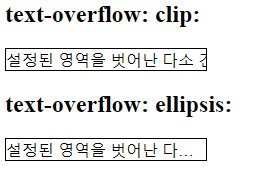
mouse over를 하면 안보이던 글자를 보여 줄 수 있다.
.test1:hover {
overflow: visible;
}
.test2:hover {
overflow: visible;
}
2. word-wrap (overflow-wrap) 한글에는 별영향이 없다.
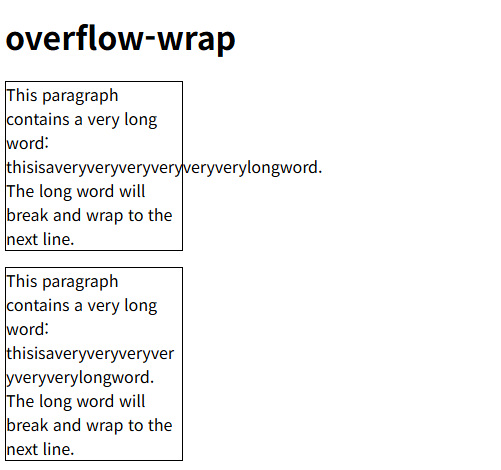
word-wrap은 단어의 길이가 부모 크기의 너비를 넘어갈 경우 단어를 잘라서 줄바꿈을 허용할지 여부를 설정하는 데 사용됩니다.
→ 현재는 overflow-wrap이 정식 속성명이며, word-wrap은 그이전 이름(호환용)입니다.
word-wrap: normal; /* 기본값, 단어 단위로 줄바꿈 (단어가 같은 줄에 배치가 어려우면 다음 줄에서 시작한다.) */
word-wrap: break-word; /* 단어 중간이라도 잘라서 줄을 바꿈 */
word-wrap: anywhere; /* 단어 중간이라도 잘라서 줄을 바꿈 break-word와 같다. */
==> overflow-wrap: normal;
==> overflow-wrap: break-word;
<!DOCTYPE html>
<html>
<head>
<style>
p.test1 {
width: 11em;
border: 1px solid #000000;
overflow-wrap: normal;
}
p.test2 {
width: 11em;
border: 1px solid #000000;
overflow-wrap: break-word;
}
</style>
</head>
<body>
<h1>overflow-wrap</h1>
<p class="test1">This paragraph contains a very long word: thisisaveryveryveryveryveryverylongword. The long word will break and wrap to the next line.</p>
<p class="test2">This paragraph contains a very long word: thisisaveryveryveryveryveryverylongword. The long word will break and wrap to the next line.</p>
</body>
</html>
[참고] word-break line breaking rules 줄 바꿀 때 단어 단위인지 글자 단위인지 설정한다.
word-break는 단어 내에서 어디에서 줄 바꿈을 허용할지를 설정합니다. 특히 CJK(Chinese, Japanese, Korean) 텍스트 처리와 관련이 깊습니다.
word-break: normal; <== 브라우저 기본 줄바꿈 규칙 (영어: 단어단위 한글:문자단위)
word-break: break-all; <== 단어 경계를 무시하고(영어: 문자단위 한글:문자단위)
word-break: keep-all; <== 브라우저 줄바꿈 규칙 (영어: 단어단위 한글:단어단위)
<!DOCTYPE html>
<html>
<head>
<style>
p.test1 {
width: 11em;
border: 1px solid #000000;
word-break: normal;
}
p.test2 {
width: 11em;
border: 1px solid #000000;
word-break: break-all;
}
p.test3 {
width: 11em;
border: 1px solid #000000;
word-break: keep-all;
}
</style>
</head>
<body>
<h1>word-break</h1>
<p class="test1">This paragraph contains some text. This line will-break-at-hyphens.</p>
<p class="test1">이것은 정말 상상하기도 힘든 엄청나게 긴단어 입니다.</p>
<p class="test2">This paragraph contains some text. The lines will break at any character.</p>
<p class="test2">이것은 정말 상상하기도 힘든 엄청나게 긴단어입니다.</p>
<p class="test3">This paragraph contains some text. The lines will break at any character.</p>
<p class="test3">이것은 정말 상상하기도 힘든 엄청나게 긴단어입니다.</p>
</body>
</html>
3. writing-mode
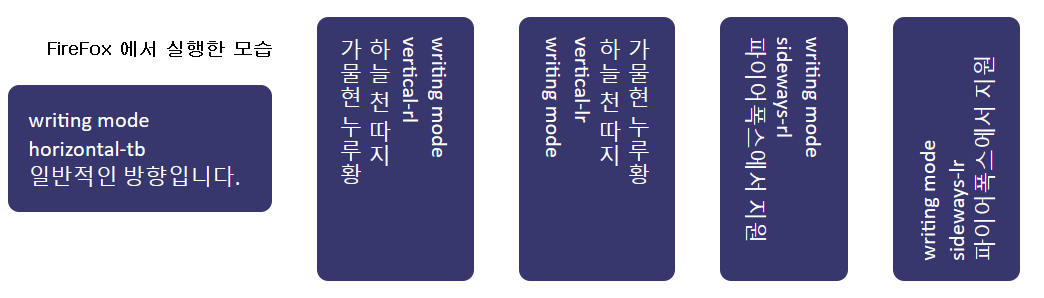
writing-mode는 텍스트의 흐름의 방향을 설정한다. 크롬은 버전 8부터 writing-mode 속성을 지원한다.
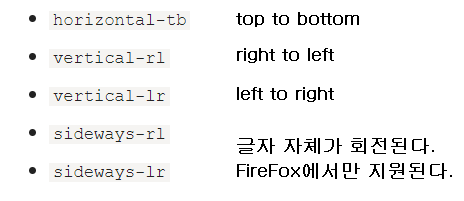
horizontal-tb: 기본값으로, 텍스트는 왼쪽에서 오른쪽으로, 블록은 위에서 아래로 흐릅니다.
vertical-rl: 텍스트는 위에서 아래로, 블록은 오른쪽에서 왼쪽으로 흐릅니다.
vertical-lr: 텍스트는 위에서 아래로, 블록은 왼쪽에서 오른쪽으로 흐릅니다.
sideways-rl: 텍스트는 오른쪽에서 왼쪽으로 (글자는 90도 회전), 블록은 위에서 아래로 흐릅니다.
sideways-lr: 텍스트는 왼쪽에서 오른쪽으로 (글자는 90도 회전), 블록은 위에서 아래로 흐릅니다.
<!DOCTYPE html>
<html>
<head>
<style>
.wrapper {
border: 5px dotted black;
inline-size: 200px;
}
.horizontal-tb {
writing-mode: horizontal-tb;
margin-bottom: 1em;
}
.vertical-rl {
writing-mode: vertical-rl;
}
.vertical-lr {
writing-mode: vertical-lr;
}
.sideways-rl {
writing-mode: sideways-rl;
}
.sideways-lr {
writing-mode: sideways-lr;
}
.drawbox {
background-color: rgb(55,55,110);
color: white;
padding: 20px;
margin: 20px;
border-radius: .5em;
inline-size: 10em;
display: inline-block;
vertical-align: middle;
}
body {
font: 1.4em/1.3 "Gill Sans", "Gill Sans MT", Calibri, sans-serif;
margin: 2em 3em;
}
</style>
</head>
<body>
<div class="drawbox horizontal-tb">writing mode
<br>horizontal-tb
<br>일반적인 방향입니다.
</div>
<div class="drawbox vertical-rl">
writing mode
<br>vertical-rl
<br>하늘 천 따지
<br>가물현 누루황
</div>
<div class="drawbox vertical-lr">
writing mode
<br>vertical-lr
<br>하늘 천 따지
<br>가물현 누루황
</div>
<div class="drawbox sideways-rl">
writing mode
<br>sideways-rl
<br>파이어폭스에서 지원
</div>
<div class="drawbox sideways-lr">
writing mode
<br>sideways-lr
<br>파이어폭스에서 지원
</div>
</body>
</html>
[참고] text-orientation property
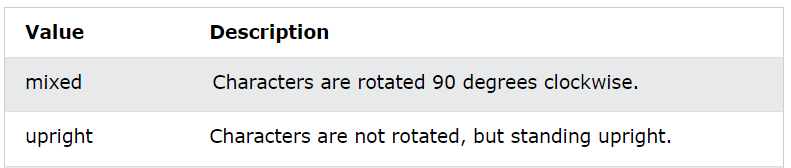
text-orientation은 글자의 방향을 설정할 수 있다.
(예) text-orientation: upright;
https://www.w3schools.com/cssref/playdemo.php?filename=playcss_text-orientation&preval=mixed
4. text-align Property
text-align는 텍스트가 horizontal 방향의 alignment을 설정하는 기능이다.

사용예) text-align: left;
https://www.w3schools.com/cssref/playdemo.php?filename=playcss_text-align&preval=center
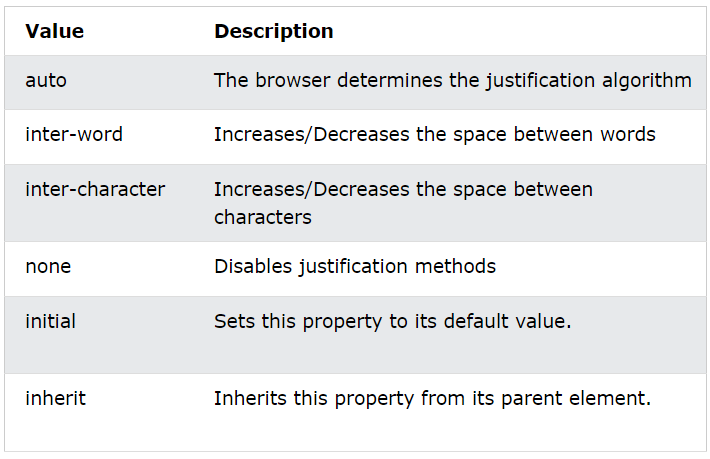
text-align: justify; 로 설정한 경우엔 다음과 같이 추가 설정이 가능하다.
https://www.w3schools.com/cssref/playit.php?filename=playcss_text-justify&preval=inter-word
(예) text-justify: auto;
5. text-decoration Property
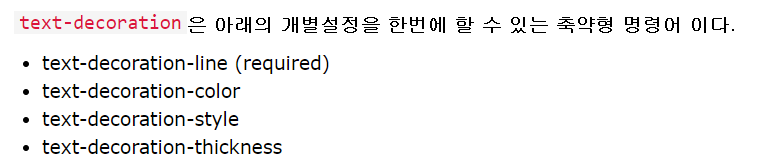
text-decoration은 텍스트에 decoration을 할 수 있다.
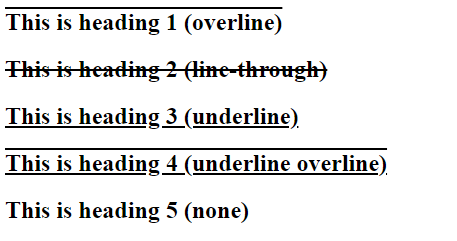
<!DOCTYPE html>
<html><head><style>
#my01 {
text-decoration: overline;
}
#my02{
text-decoration: line-through;
}
#my03{
text-decoration: underline;
}
#my04{
text-decoration: underline overline;
}
#my05{
text-decoration: none;
}
</style></head>
<body>
<h2 id="my01">This is heading 1 (overline) </h2>
<h2 id="my02">This is heading 2 (line-through)</h2>
<h2 id="my03">This is heading 3 (underline)</h2>
<h2 id="my04">This is heading 4 (underline overline)</h2>
<h2 id="my05">This is heading 5 (none)</h2>
</body>
</html>
컬러를 설정할 수 있다.
text-decoration-color: red;
스타일을 설정할 수 있다. https://www.w3schools.com/cssref/playdemo.php?filename=playcss_text-decoration-style
text-decoration-style: solid;
text-decoration-style: wavy;
text-decoration-style: double;
thickness 를 설정할 수 있다.
text-decoration-thickness: 5px;
6. text-indent Property
첫번째 라인의 들여쓰기를 설정할 수 있다.
사용예) text-indent: 50px;
https://www.w3schools.com/cssref/tryit.php?filename=trycss_text-indent